Borrowing Blueprints: Exposure to UI Frameworks
25 Feb 2026
My First UI Framework: Another “New Language” Feeling
Prior to taking a software engineering course this Spring 2026 semester, I had never touched a UI framework. My initial exposure to front-end work was essentially: write HTML, write CSS, refresh the page, and tweak it until it looks right. When the learning module regarding frameworks came around, it broadened my scope in understanding that CSS was not only a layout problem; it became a vocabulary problem and it gave me the idea that a “right answer” can be a combination of class names instead of an entirely new CSS rule.
An assignment I have completed in my ICS 314: Software Engineering I course involved recreating a simplified version of the Island Snow web page. A great amount of the structure and alignment for this assignment happened directly in the HTML file by composing Bootstrap classes.
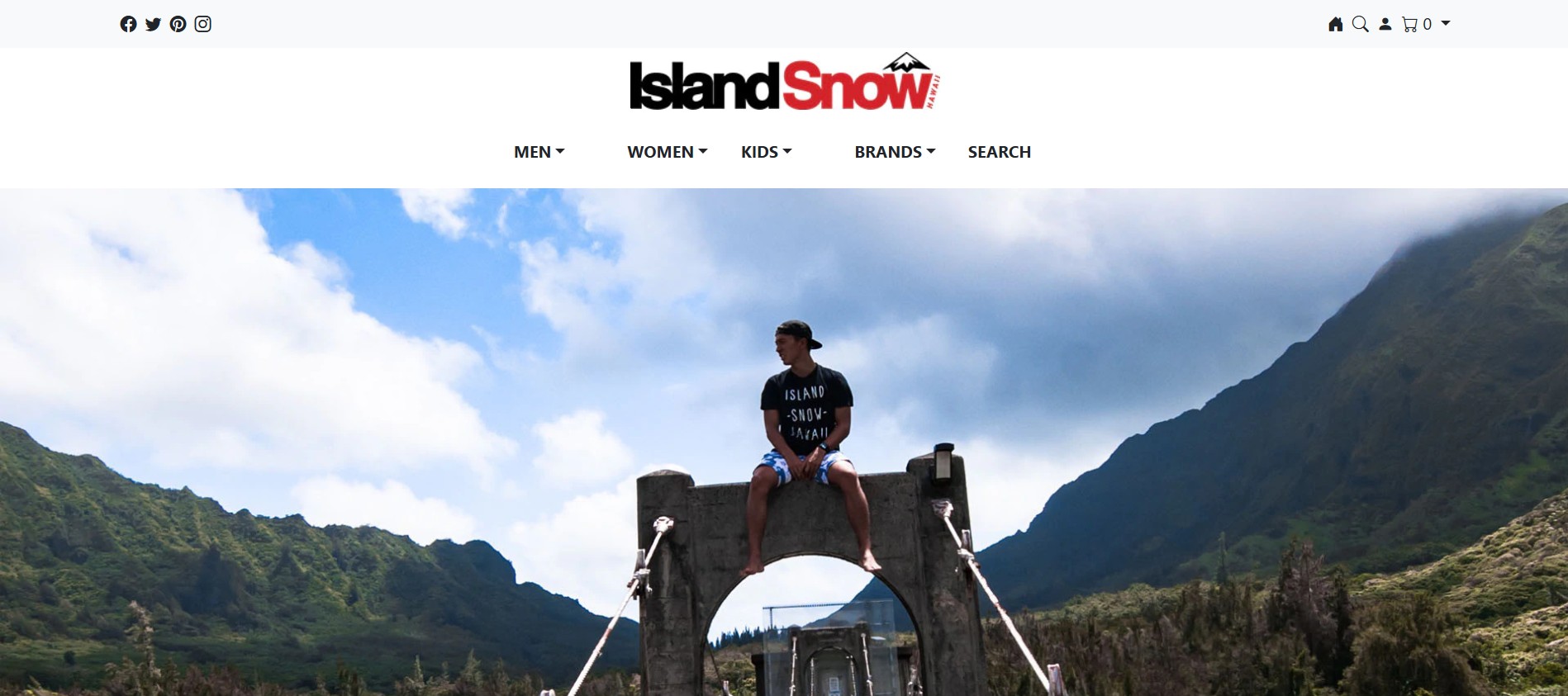
Snapshot 1. My Island Snow web page built with Bootstrap 5
Another assignment involved recreating a web page of our own choice; in particular, I chose a famous beachside restaurant from my hometown called Kimo’s. The same deal applied with this assignment in that most of its composition was done through HTML via Bootstrap classes.
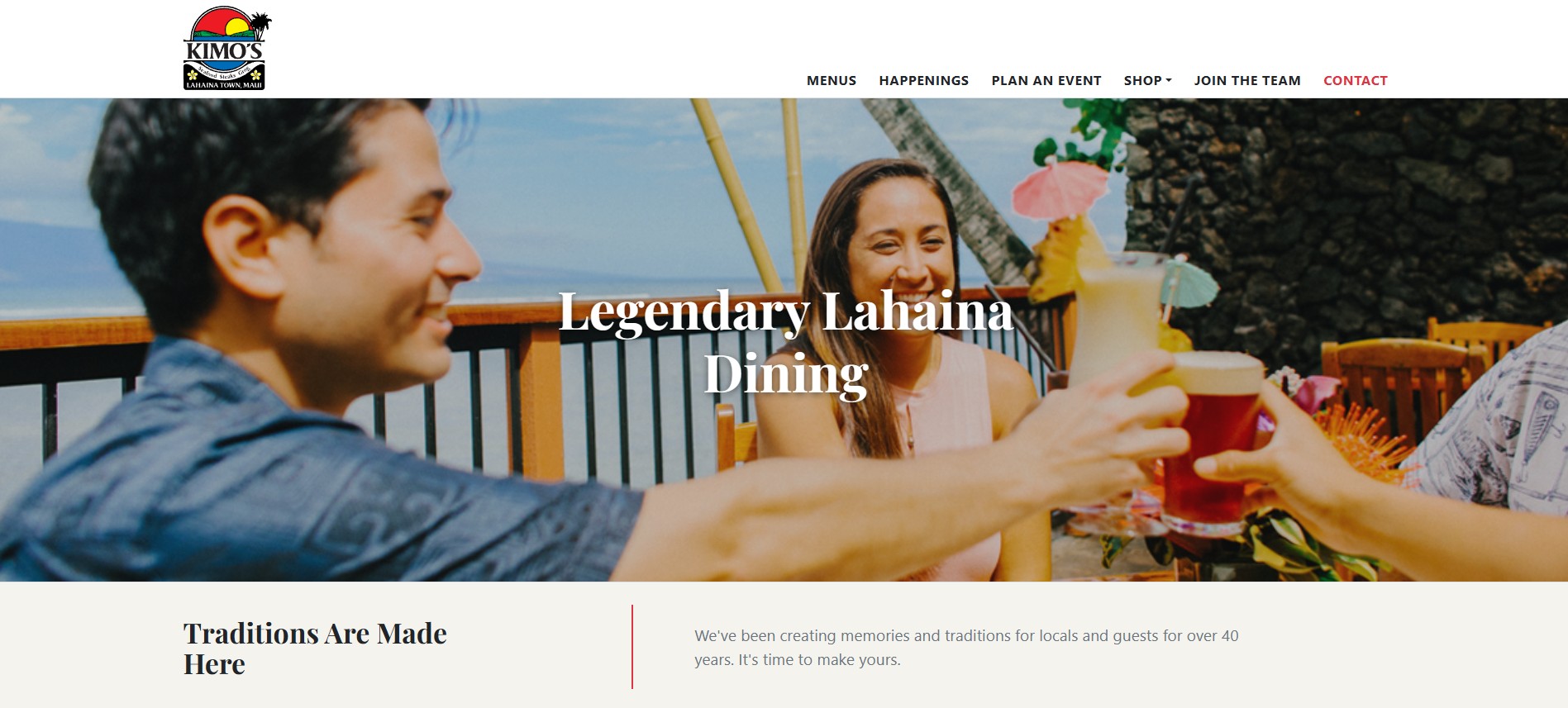
Snapshot 2. My Kimo's web page built with Bootstrap 5
At first, doing all of this felt weird since I was doing all the styling in HTML. After building a couple more web pages though, it all started to make more sense. Bootstrap is not trying to replace either HTML or CSS fundamentals rather it is a form of trying to standardize the most common layout decisions so that I don’t have to reinvent them every single time.
Why Would I Bother With Bootstrap 5?
The major reason I see why many turn toward utilizing a framework is that it provides a reliable structure that prevents layout chaos. Without a framework, I can make something look correct on my screen, however, it does not protect me from the unpredictable behavior of displaying it at different widths when resizing the window nor guarantee essential long-term code stability.
Bootstrap gives me patterns that “want” to behave well. In Island Snow, I used a top navbar layout that relies on Bootstrap’s navbar, nav, spacing utilities, and icon classes from Bootstrap Icons. In other words, I don’t have to manually position every icon with custom CSS since Bootstrap already solves this basic alignment and spacing problem. Moreover, I did not have to build a dropdown menu behavior from scratch when creating a cart interaction. Bootstrap’s dropdown structure was already there waiting for me to implement it. Realistically speaking, the payoff becomes eye-catching when mentioning hand-building behavior and layouts as opposed to plugging into a system that already expects common UI needs. Below is a code snippet of the navigation bar I created for my Island Snow recreation.
  <nav class="navbar bg-light">
      <div class="container">
          <ul class="nav">
              <li class="nav-item p-1"><i class="bi bi-facebook"></i></li>
              <li class="nav-item p-1"><i class="bi bi-twitter"></i></li>
              <li class="nav-item p-1"><i class="bi bi-pinterest"></i></li>
              <li class="nav-item p-1"><i class="bi bi-instagram"></i></li>
          </ul>
          <ul class="nav justify-content-end">
              <li class="nav-item p-1"><i class="bi bi-house-door-fill"></i></li>
              <li class="nav-item p-1"><i class="bi bi-search"></i></li>
              <li class="nav-item p-1"><i class="bi bi-person-fill"></i></li>
              <div class="dropdown-toggle p-1" href="#" role="button" data-bs-toggle="dropdown" aria-expanded="false">
                   <i class="bi bi-cart"></i> 0
                  <ul class="dropdown-menu dropdown-menu-end">
                      <li><a class="dropdown-item" href="#">Cart is empty.</a></li>
              </ul>
          </ul>
       </div>
  </nav>
The Return of My Investment?
As frustrating and time consuming the learning curve posed itself to be with Bootstrap, I ultimately benefitted in three practical ways:
- Speed: Once I started to familiarize myself with a few key building blocks, like containers or spacing utilities, I noticed how much faster I was at building web pages. My Island Snow recreation is a good example of this as the layout uses multiple containers and rows to create consistent margins and spacing between sections.
- Consistency: Frameworks reduce “random design” and this was relevant to me as a beginner with raw CSS styling. Bootstrap pushed me toward using consistent spacing decisions and structures through use of its utilities and grid. In Island Snow, the footer is structured as three equivalent columns using a Bootstrap ‘row’ and multiple ‘col’ elements. Doing this was cleaner than writing a custom layout approach for every instance a footer element was needed.
-
Responsiveness: Even when I can attempt implementing responsiveness in CSS, Bootstrap’s grid and responsive classes make “good enough” responsiveness easier for me especially this early on into my career. In my Kimo’s web page recreation, the info strip section is responsive using ‘col-md’ and alignment utilities so that it is adaptable across varying screen sizes.
For reference, below are two of the footers I created for each page respectively with these returns in mind.

Snapshot 3. My Island Snow web page footer built with Bootstrap 5

Snapshot 4. My Kimo's web page footer built with Bootstrap 5
So Why Not Just Use Raw HTML and CSS?
Raw HTML and CSS absolutely works and I honestly believe its still essential to learn. If I did not take the time to understand CSS fundamentals I can guarantee that frameworks would continue to be a black box to me. Regardless, I noticed that raw HTML and CSS gets increasingly difficult to manage when I wanted consistent spacing across a whole site, a predictable layout system, and the ability to reuse components I created before such as navbars, dropdowns, buttons, and footers.
Without a framework, I see creation as a form of inventing my own mini-framework that is reliant on its own spacing scale, layout rules, and component styles. This was great for learning everything at first, however, it was also quite easy to get messy with as altering certain styles increased expectations in maintainability. Bootstrap essentially gives a pre-made system for me to spend building the site which is more efficient as opposed to rebuilding the same layout rules over and over again. Below is a code snippet of the footer I created for my Kimo’s recreation utilizing said provided layout from Bootstrap.
<!-- Footer -->
<footer class="text-white" style="background-color:#006cb8;">
<div class="container py-5">
<div class="row align-items-center">
<!-- L.H.S. Text -->
<div class="col-md-5 d-flex justify-content-center justify-content-md-center align-items-center gap-3">
<div class="fw-bold text-uppercase kimos-title-font" style="letter-spacing:1px; font-size:24px;">
Follow Us
</div>
<!-- White vertical divider -->
<div class="border-start border-white" style="height:34px; width:2px"></div>
<!-- L.H.S. Social Media Icons -->
<div class="d-flex gap-3" style="font-size:24px;">
<a class="text-white text-decoration-none" href="#"><strong>f</strong></a>
<a class="text-white text-decoration-none" href="#"><i class="bi bi-twitter"></i></a>
<a class="text-white text-decoration-none" href="#"><i class="bi bi-instagram"></i></a>
</div>
</div>
<!-- R.H.S. Newsletter and white vertical divider -->
<div class="col-md-7 text-center border-start border-white ps-md-5 mt-4 mt-md-0">
<div style="font-size:21px;">
Sign Up For Our Newsletter
</div>
<div class="text-white-75 mb-3" style="font-size:18px;">
Receive updates & specials for Kimo's directly to<br class="d-none d-md-block">
your inbox!
</div>
<!-- Button -->
<a class="btn btn-danger fw-bold px-4 py-2" href="#" style="font-size:0.9rem;">
CLICK HERE
</a>
</div>
</div>
</div>
</footer>
The Software Engineering Benefits
Expanding on the notion of black boxes; the part about learning UI frameworks that surprised me the most was how they’re not only visuals but, they are closely tied with software engineering. Three software engineering practices I took away from UI frameworks is:
- Maintainability: In my Island Snow recreation, my custom CSS file was minimal in that it focused the footer color and text color. Most of the layout and spacing was handled by Bootstrap classes and this was a key detail since fewer CSS rules often meant fewer conflicts with the custom styling later on.
- Shared Conventions: If I were to hand my project over to a classmate, Bootstrap classes serve as a shared language. Any of my classmates who has a decent understanding of Bootstrap can look at classes I utilized such as ‘container’, ‘row’, ‘col’, ‘d-flex’, and can immediately infer the intent of my styling. I feel this is really similar to coding standards in programming as the idea of “less guessing and more consistency” is enforced.
- Repetition: In my Kimo’s recreation, I relied on repeatable patterns for alignment and spacing, along with a main banner layout that uses positioning utilities with an overlay.
Essentially, this is the real engineering value UI frameworks provide; it gives us with the chance to replicate an idea reliably and efficiently.
Where Bootstrap Still Needs “Real CSS”
Frameworks is not magic, unfortunately, though they do provide a strong foundation for developing a custom CSS which polishes uniqueness. I learned this when working on my Kimo’s page where I used custom CSS for personality. More specifically, I used a custom font class, a banner background image and sizing, and a text shadow for readability. Bootstrap handled the layout and structure, whereas my CSS file handled branding and visual identity. This balance felt like the best approach as it separated responsibilities which helped make corrections and formatting easier.
The Downsides from My Newbie Perspective
Even though I am sold on the usefulness of frameworks, I also noticed some drawbacks. One drawback is the how front-loaded the learning curve is; I did not benefit until I knew enough classes and patterns to stop “guessing” and hoping things work out. Another drawback is how class-heavy HTML becomes; in creating so many sections and subsections of a website it was easy for the HTML to feel cluttered with utilities. Moreover, fighting the framework happens very easily; when I get stuck trying to understand the grid or layout model of a desired design, I end up stacking classes incorrectly and spend a lot of time trying to figure out why my implementation is messing up.
Concluding Thoughts on UI Frameworks
As someone who is using UI frameworks for the first time, I do not necessarily see Bootstrap 5 as better than HTML and CSS. I see it more like a system that makes layout decisions more standardized, quicker to implement, and easier to maintain. Raw HTML and CSS is still the foundation but, Bootstrap gave me something I did not have before which is a consistent repeatable structure for building responsive pages that don’t fall apart the moment there is a requirement change. Once I noticed the patterns, my frustration translated into speed and comfortability; that alone sums up my learning about UI frameworks and my perspective on why I believe it was worth it.